





Clean Up Orphaned SEO URLs in OXID eShop with Data Consistency Tools
SEO URL consistency checking — find orphaned and duplicate URLs, export them, and delete safely from a CSV. Introduced in v2.0.0, with fine-grained shop/language deletion added in v2.0.1.
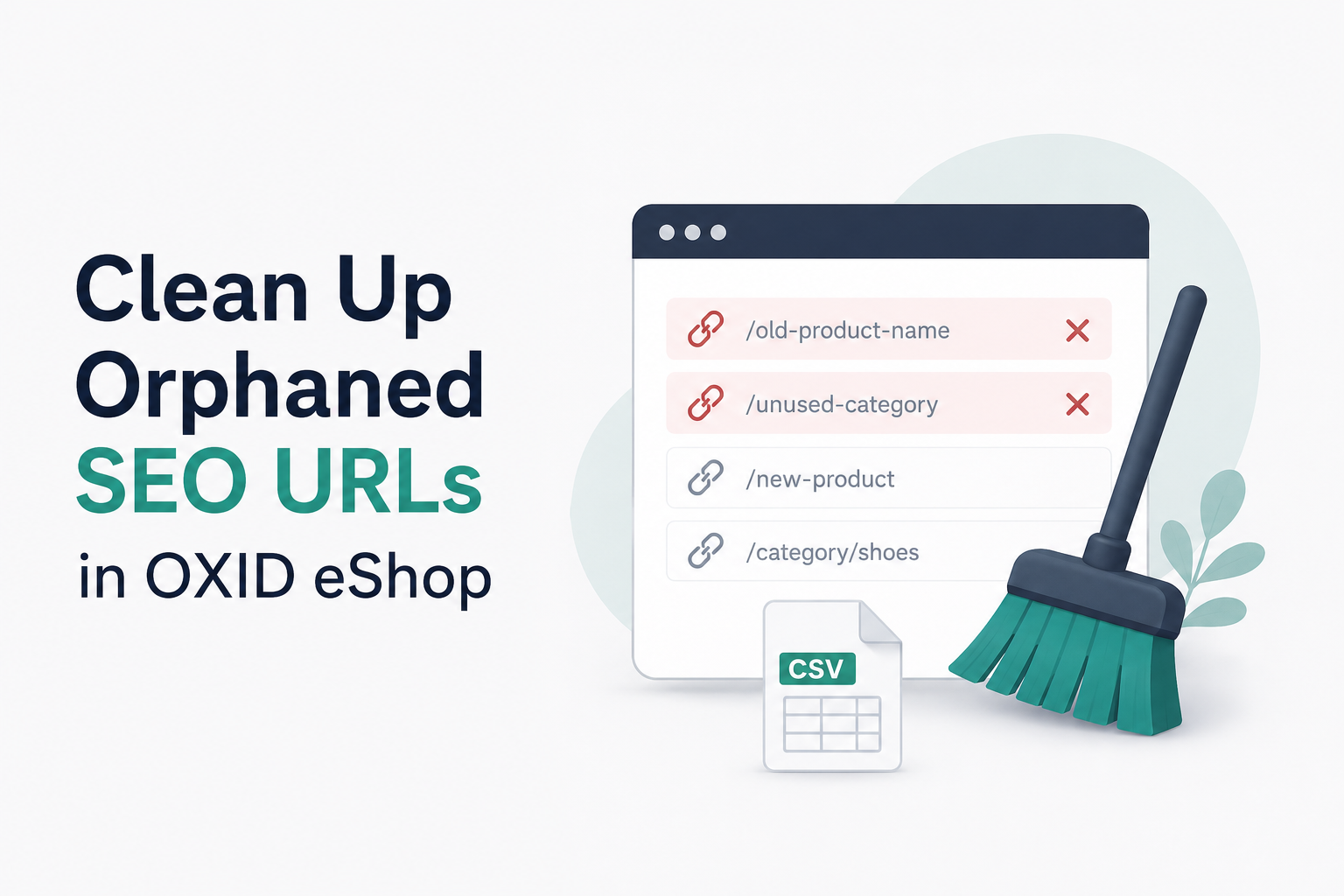
Building on the image cleanup feature from earlier releases, v2.0.0 of the OXID Data Consistency Tool adds SEO URL consistency checking. The new capability identifies orphaned or duplicate SEO URLs that accumulate over time in your eShop database — and gives you a safe, CSV-based workflow to clean them up.
A Note on the Export Directory
Required before running in production. By default, app.export_directory_path resolves to /var/www/source/export, which on most setups sits inside the web document root. The shop's global source/.htaccess does not deny .csv, so exported files there are reachable via https://<your-shop>/export/<filename>.csv. The SEO URL CSVs do not contain customer PII, but they list URL paths and internal object identifiers.
Before running export commands in production, either:
- Override
app.export_directory_pathto a path outside the document root (e.g./var/log/oxid/exports), or - Drop a deny-all
.htaccessinto the export directory.
The README shows both options in full.
Why SEO URL Consistency Matters
Over the lifecycle of an eShop, products come and go, categories get reorganized, and content pages are updated or removed. While the visible elements disappear, their SEO URLs often remain in the database, creating several issues:
Dead links
Orphaned URLs pointing to deleted products create frustrating 404 errors for customers
Search engine impact
Search engines may continue indexing these dead links, hurting your SEO rankings
Database bloat
Unused entries accumulate over time, potentially impacting query performance
URL collisions
When OXID detects duplicate URLs, it adds suffixes (like -oxid), indicating potential data integrity issues
The new SEO URL checks give you the tools to identify these problems and clean them up safely.
A Closer Look: SEO URL Checks
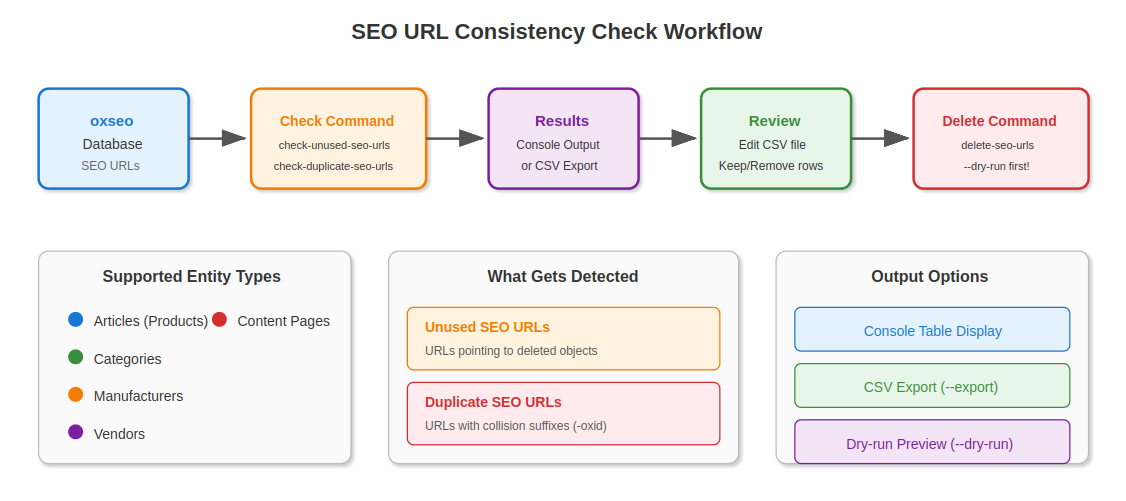
Version 2.0.0 introduces three new console commands for comprehensive SEO URL management:
| Command | Purpose |
|---|---|
check-unused-seo-urls | Find orphaned URLs where the linked product, category, manufacturer, vendor, or content page no longer exists |
check-duplicate-seo-urls | Find URLs with collision suffixes indicating duplicate entries |
delete-seo-urls | Batch delete SEO URLs from an exported CSV file with dry-run support |
Supported Entity Types
The SEO URL checks cover all major OXID entity types:
oxarticlesCategories— oxcategoriesManufacturers— oxmanufacturersVendors— oxvendorContent pages— oxcontentsCompatibility: Compatible with OXID eShop Compilation 7.4 and 7.5. The tool's composer.json enforces a minimum of 7.4 via conflict: oxid-esales/oxideshop-ce <7.4.
Installation
To get started, install or update the tool via Composer:
composer require oxid-esales/consistency-check-toolRepository: github.com/OXID-eSales/consistency-check-tool
Usage: SEO URL Commands
Check Unused SEO URLs
Detect SEO URLs where the target object no longer exists in the database:
vendor/bin/oe-console oe:consistency_check:check-unused-seo-urlsExport results to a CSV file for review:
vendor/bin/oe-console oe:consistency_check:check-unused-seo-urls --exportCheck Duplicate SEO URLs
Detect SEO URLs with collision suffixes. The command reads the collision suffix from your shop configuration (sSEOuprefix):
vendor/bin/oe-console oe:consistency_check:check-duplicate-seo-urlsYou can also specify a custom suffix to search for:
vendor/bin/oe-console oe:consistency_check:check-duplicate-seo-urls --suffix=-duplicateExport results to CSV:
vendor/bin/oe-console oe:consistency_check:check-duplicate-seo-urls --exportDelete SEO URLs from CSV
Delete SEO URLs listed in a previously exported CSV file:
vendor/bin/oe-console oe:consistency_check:delete-seo-urls /path/to/exported.csvUse --dry-run to preview deletions without making changes:
vendor/bin/oe-console oe:consistency_check:delete-seo-urls /path/to/exported.csv --dry-runRecommended Workflow
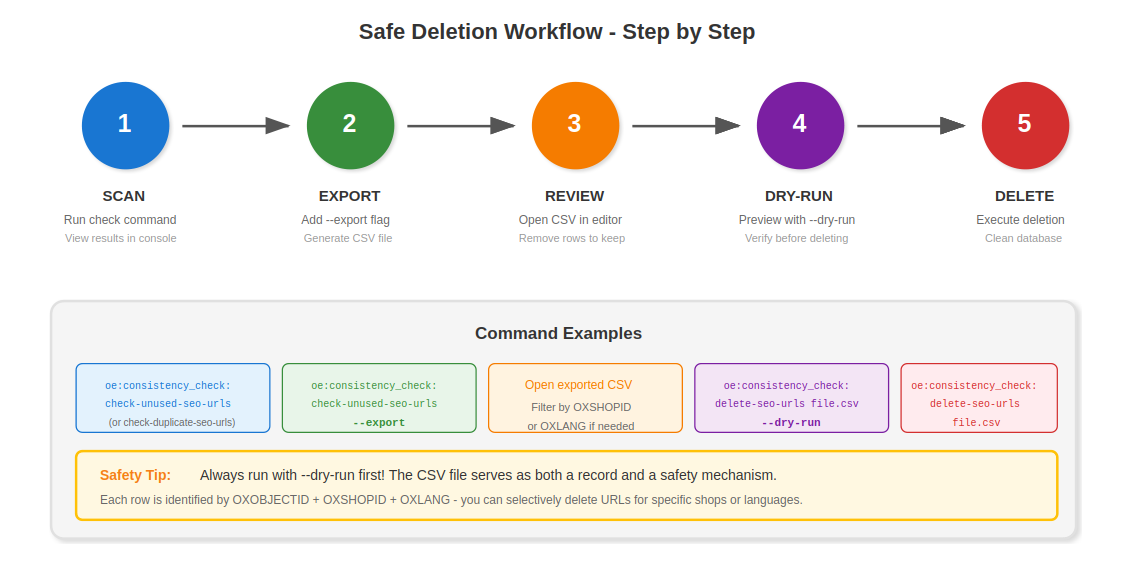
We recommend following this safe, step-by-step process:
Run check command
Run the check command to see results in console.
Export to CSV
Run check command with --export to generate a CSV file.
Review the CSV
Review the CSV file and remove any rows you want to keep. Each row is identified by its unique combination of OXOBJECTID, OXSHOPID, and OXLANG. Since v2.0.1, you can filter the CSV to delete URLs for specific shops or languages only.
Dry run
Run delete command with --dry-run to preview what will be deleted.
Delete
Run delete command to perform actual deletion.
Custom Configuration
The tool ships with the following default parameters:
parameters:
  app.export_directory_path: '/var/www/source/export'
  app.unused_seo_urls_file: 'Unused-Seo-Urls'
  app.duplicate_seo_urls_file: 'Duplicate-Seo-Urls'
These resolve to absolute paths. To customize, create a configurable_services.yaml file in var/configuration/ and override the parameters. For example:
parameters:
  app.export_directory_path: 'var/exports'
  app.unused_seo_urls_file: 'orphaned-seo-urls'
  app.duplicate_seo_urls_file: 'collision-seo-urls'
Overridden paths are relative to the OXID eShop root directory.
Visual Overview
The workflow below shows how the SEO URL consistency checks operate:
Looking Ahead
The OXID Data Consistency Tool continues to evolve. With image cleanup, SEO URL management, and the new Export-by-Filter framework in v3.0.0, the tool now provides multiple complementary patterns for maintaining data integrity. Each command follows the same shape: dry-run, CSV-based, privacy-minimal by design.
Feedback
Open an issue on GitHub if a check you'd like to see is missing, or contribute one through a PR.
GitHub Repository: github.com/OXID-eSales/consistency-check-tool
About the Author
Rahat Hameed
Software Developer at OXID eSales
Rahat Hameed is a Software Developer at OXID eSales, building features for the OXID platform.
Released June 2025; updated with fine-grained shop/language deletion in v2.0.1.